FANUC External Mode Select: Simplifying Mode Control Across Your Robot Cell
Switching all your robots between teach and production modes from one central controller improves both safety and convenience.
Why this option exists
Every FANUC robot controller comes with a key switch that lets operators choose between three operating modes: T1 (Teach mode) for slow, safe testing, T2 (fast teach, where available), and AUTO for full production speed. In a single-robot setup, this is simple. But in a multi-robot cell, operators or maintenance techs must walk from one controller to another to change each key.
That approach is not just inconvenient. It can introduce risk. If someone forgets to switch one robot back to the correct mode, the entire cell could stop or run unsafely. FANUC’s External Mode Select option solves this by letting the system set robot modes automatically and consistently from one point.
How it works behind the scenes
When the External Mode Select option is enabled, the controller listens to two dedicated safe signals that determine its mode. These signals come from a safety-rated device such as a PLC or HMI with proper safety inputs and outputs.
The robot’s internal logic interprets these signals to enter either Teach (T1) or Auto mode. Because this process uses Dual Check Safety (DCS), it is certified and traceable, which is important for cells that must meet safety standards.

Mode Select on the FANUC Controller
When to use External Mode Select
- Multi-robot cells that need synchronized mode changes.
- Systems where the safety PLC already manages doors, scanners, and e-stops.
- Facilities requiring centralized control for safety and maintenance consistency.
- Applications where physical access to each controller is limited.
Alternative options
- TP Mode Select: A software option that lets you switch modes directly from the teach pendant is useful for single-robot setups.
- Remote-mounted key switch: Move the controller’s physical key to a door station with an extension harness. This setup is simple and effective for one robot, but not tied into system-wide safety logic.
Implementation tips for integrators
For those adding this option to an existing robot:
- Verify your controller type (R-30iB, R-30iB Plus, or Mate variant) and order the correct External Mode Select option.
- Configure Safe I/O Connect and assign the SSO[6]/SSO[7] signals to your safety PLC logic.
- Confirm your system validation meets required safety levels.
- Document your safety tests and train all operators on how mode control now works.
| Scenario | Best Option | Benefit |
|---|---|---|
| Multi-robot cell, central safety PLC | External Mode Select | All robots switch modes together — safer and faster. |
| Single robot with pendant control | TP Mode Select | Choose modes directly on the teach pendant. |
| Single robot, key relocated for convenience | Remote-mounted key switch | Simple relocation, no software change needed. |
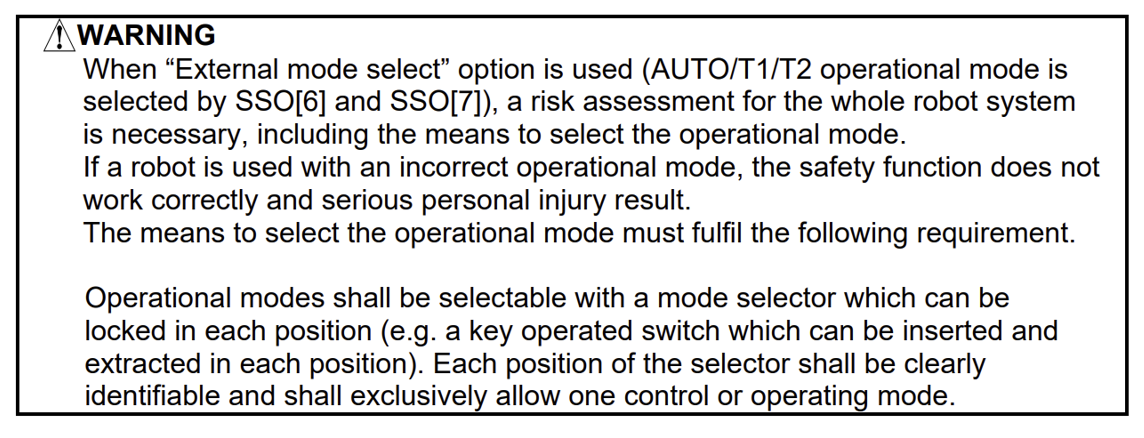
Additional clarifications regarding this option from the FANUC manual guidelines:
Adding it to your system
The External Mode Select option can be included when purchasing a new robot or added later during an upgrade. If you’re implementing a multi-robot cell or upgrading to centralized mode control, talk with your Motion Controls Robotics representative to ensure your system configuration, wiring, and safety logic are properly designed and validated. FANUC has a great page on their site that list all their software options alphabetically and gives you a quick blurb about what they do. External Mode Select is listed - FANUC Software List
Contact Motion Controls Robotics
Safety note: Always follow current FANUC manuals and your facility’s risk assessment procedures when modifying or implementing robot mode control. Validate any change as a safety-rated function.